

Zoho CRM and MailerLite demo booking nurture
We built this pair of Zaps for a software company that sells through booked demos. The first Zap runs on every new Zoho CRM lead, checks which forms the lead filled in, sets the lead status to Demo Booked or Demo Not Booked, and adds non-booked leads to a MailerLite group based on the lead owner. The second Zap runs every day, finds leads who have since booked, updates their status and removes them from their MailerLite group.
- Practice
- AI Automation
- Service
- Lead Generation & CRM
- Type
- Client automation
The work
How the automation works
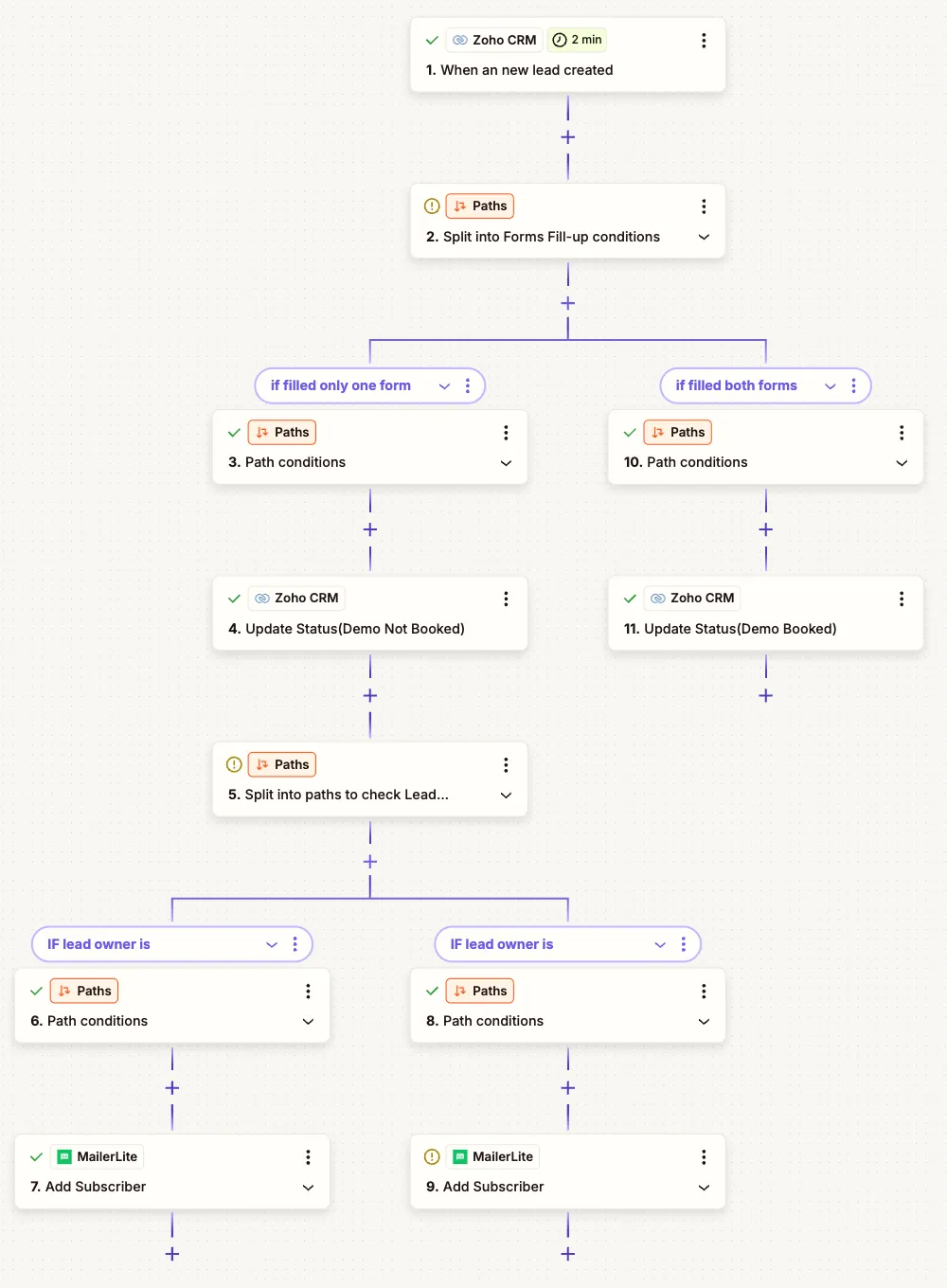
1.The new lead Zap: Zoho CRM trigger, paths by forms filled, status updates, then paths by lead owner into MailerLite groups. 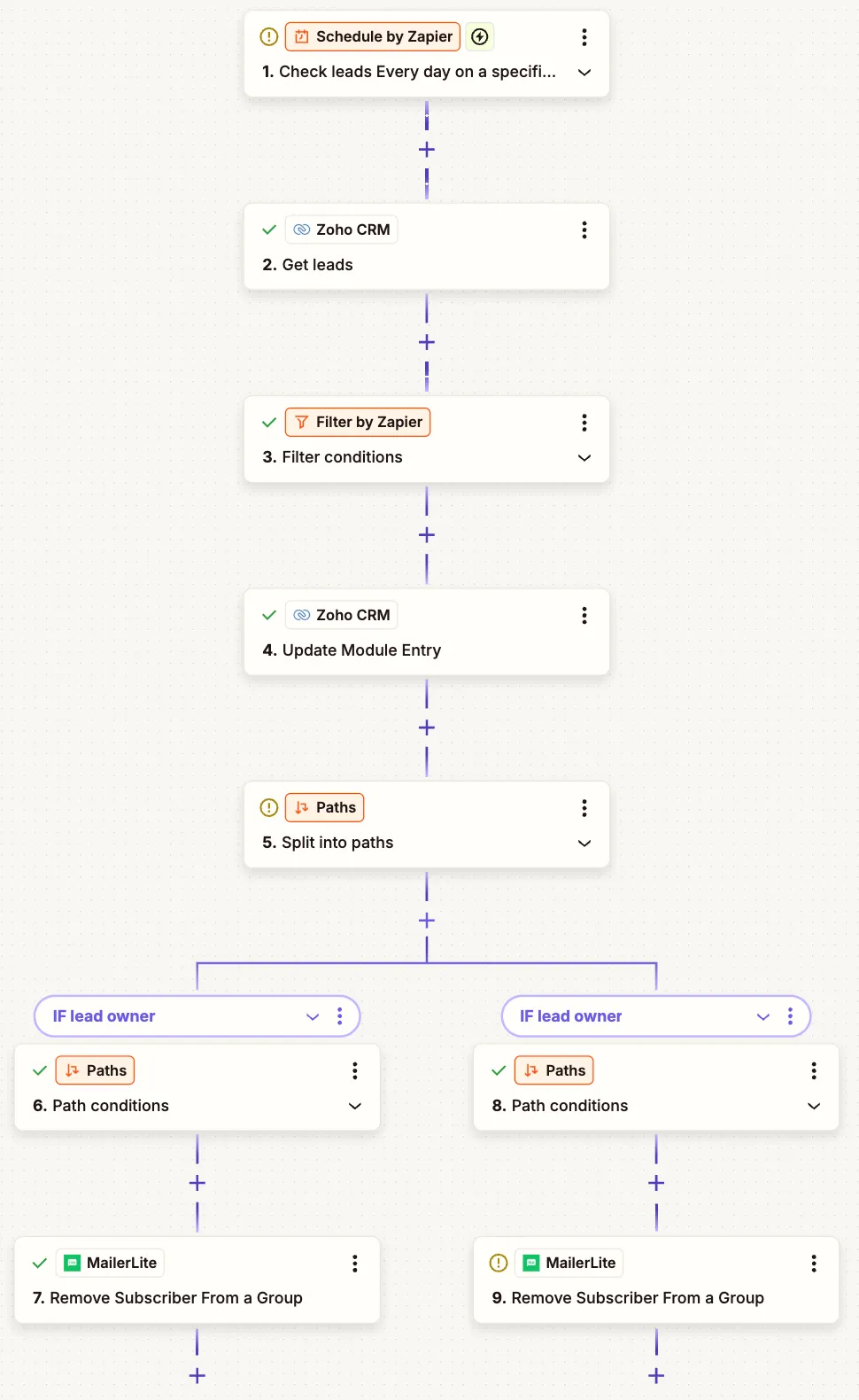
2.The daily cleanup Zap: schedule, get leads, filter for booked demos, update the entry and remove the subscriber by owner.
Project brief
Deliverables
- New lead Zap with form-based paths
- Automatic Demo Booked and Demo Not Booked status updates
- Owner-based routing to MailerLite groups
- Daily scheduled Zap that removes booked leads
- Filter rules for demo booking status
The challenge
Leads who do not book a demo need a nurture sequence, and leads who do book need to leave it. When the list is kept by hand, leads are added late or not at all, and people who have already booked keep getting emails asking them to book.
Our approach
Zap one triggers when a new lead is created in Zoho CRM. A Paths step splits on the forms the lead completed. If only one form was filled, the lead status is updated to Demo Not Booked, and a second Paths step checks the lead owner and adds the subscriber to that owner's MailerLite group, which feeds the nurture campaign. If both forms were filled, the status is set to Demo Booked. Zap two runs on a daily schedule, gets leads from Zoho CRM, filters for those who have now booked, updates the module entry and uses the same owner paths to remove the subscriber from the right MailerLite group.
The outcome
Lead status in Zoho CRM now reflects demo booking without manual updates, each sales owner's MailerLite group holds only leads who still need a demo, and leads stop getting nurture emails within a day of booking.
- Trigger
- New Zoho CRM lead, plus a daily check
- Stack
- Zapier, Zoho CRM, MailerLite
- Handles
- Lead status, owner groups, daily cleanup
How we did it
Step 01
Review the lead data
We looked at how forms and demo bookings showed up on Zoho CRM leads and which fields we could rely on.
Step 02
Plan two Zaps
We split the work into an instant Zap for new leads and a daily Zap for cleanup, so late bookings are still caught.
Step 03
Build the paths
We built the form and lead owner paths so each lead lands in, or leaves, the right MailerLite group.
Step 04
Test with sample leads
We created test leads in each state and checked the status updates and group changes.
Tools and platforms
- Zapier
- Zoho CRM
- MailerLite
Why this project matters
For a demo-led sales process, the nurture list has to match reality. Keeping CRM status and email groups in sync means the right people get the right emails.
Questions about this project
Does this work with other email tools?
Yes. The MailerLite steps can be replaced with Mailchimp, ActiveCampaign, Klaviyo or another tool that Zapier supports, using the same paths and filters.
Can you build something similar for my business?
Yes. We adapt the triggers, rules and lists to your CRM and email platform. After a short call we send a fixed quote.
Related services and articles
Have a project like this in mind?
Tell us what you're working on. We'll come back with a clear plan and a realistic timeline.