

AI YouTube Shorts generator with automatic upload
We built this workflow for a client who publishes short-form video on YouTube and wanted to produce Shorts from a topic list. Each run reads a topic from Google Sheets, researches it with a Gemini agent and Tavily search, sends a generation job to Decart, polls until the video is ready, downloads it, uploads it to YouTube and logs the upload in the sheet.
- Practice
- AI Automation
- Service
- Content & Operations
- Type
- Client automation
The work
How the automation works

1.The n8n workflow: topic row, research agent, Decart video job with a wait-and-check loop, YouTube upload and sheet update. 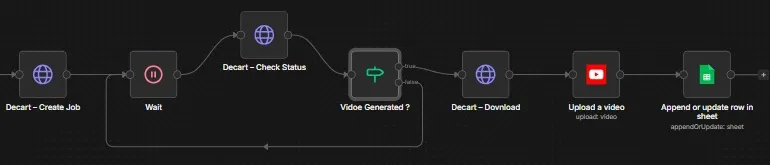
2.Close-up of the polling loop: the workflow waits, checks the Decart job status and downloads only once the video is ready.
Project brief
Deliverables
- Topic queue in Google Sheets with result logging
- Gemini research agent with Tavily search
- Decart video job creation through the API
- Wait-and-check loop that polls until the render is done
- Download and YouTube upload steps
The challenge
Short-form video needs a steady output to gain traction, but every Short means scripting, generating footage, waiting on renders and uploading by hand. That routine is hard to keep up alongside other work.
Our approach
The workflow reads the next topic row from Google Sheets. A research agent on Gemini uses Tavily search through an HTTP tool to build the prompt for the video. An HTTP request creates a video job on the Decart API. Because rendering takes time, the workflow waits, checks the job status and loops back through the wait step until an IF node confirms the video is generated. It then downloads the file, uploads it with the YouTube node and writes the result back to the sheet.
The outcome
The client can queue video ideas in a sheet and let the workflow handle research, generation, render polling and upload, with each finished Short recorded against its topic.
- Trigger
- Topic row in Google Sheets
- Stack
- n8n, Gemini, Tavily, Decart, YouTube
- Handles
- Research, video job, polling and upload
How we did it
Step 01
Plan the pipeline
We mapped the path from a topic row to a published Short and the data each step needs.
Step 02
Research and prompt
We built the Gemini research agent with Tavily search to shape each video prompt.
Step 03
Handle the render
We created the Decart job call and a polling loop so the workflow waits for the video instead of failing.
Step 04
Upload and record
We connected the YouTube upload and sheet update, then ran the full flow on test topics.
Tools and platforms
- n8n
- Google Gemini
- Tavily
- Decart
- YouTube
- Google Sheets
Why this project matters
Video generation is slow and asynchronous, so the polling loop is what makes the pipeline dependable enough to run without someone watching it.
Questions about this project
Can it post to TikTok or Instagram Reels as well?
Yes. Once the video file is downloaded, we can add upload steps for other platforms that offer an API, alongside the YouTube upload.
Can you build something similar for my business?
Yes. We adapt the workflow to your tools and process, including the video model you prefer, and give you a fixed quote after a short call.
Related services and articles


Have a project like this in mind?
Tell us what you're working on. We'll come back with a clear plan and a realistic timeline.