

YouTube content research agent with transcript analysis
We built this agent for a content team that plans videos by studying what already performs on YouTube. A team member submits a search through a form. The workflow uses Apify to find videos and fetch their transcripts, then an OpenAI agent with a structured output parser breaks each transcript down into key concepts, recurring themes and unique angles and writes one row per video to Google Sheets.
- Practice
- AI Automation
- Service
- Content & Operations
- Type
- Client automation
The work
How the automation works
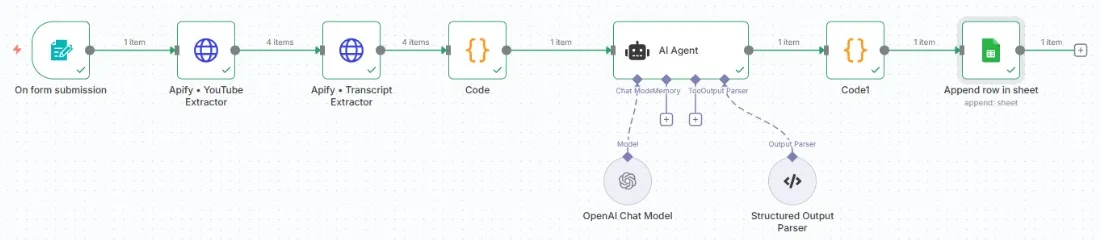
1.The n8n workflow: form submission, Apify video and transcript extractors, an OpenAI agent with a structured parser, then Google Sheets. 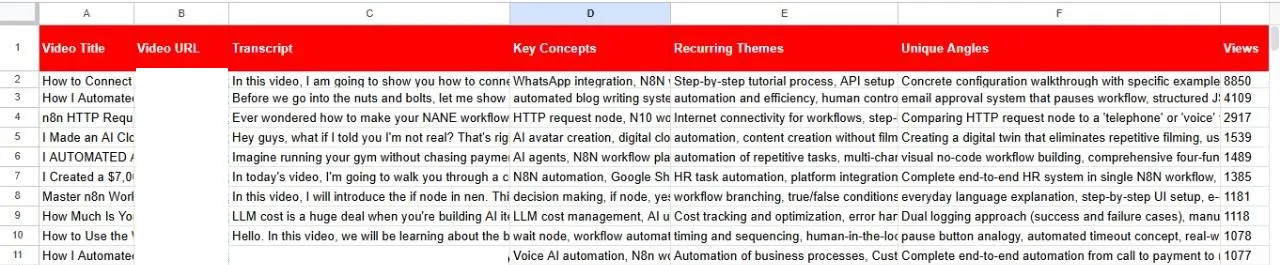
2.The output sheet: transcript, key concepts, recurring themes and unique angles per video (links covered).
Project brief
Deliverables
- Form for submitting research topics
- Apify YouTube video and transcript extraction
- OpenAI analysis agent with a structured output parser
- Google Sheets research log with one row per video
The challenge
Researching a topic on YouTube means watching hours of video and taking notes by hand. The notes end up scattered, and it is hard to compare what different creators cover or where the gaps are.
Our approach
An n8n form collects the search input. An HTTP request runs an Apify YouTube scraper to find matching videos, and a second Apify actor extracts each transcript. A code step cleans and combines the data. An AI agent on an OpenAI chat model analyzes each transcript, and a structured output parser makes sure the result always has the same fields. A final code step formats the row, and the workflow appends the title, link, transcript, key concepts, recurring themes, unique angles and view count to Google Sheets.
The outcome
The team now gets a structured research sheet for any topic in one run, with each video's ideas and angles side by side, ready for planning new content.
- Trigger
- Research form submission
- Stack
- n8n, Apify, OpenAI, Google Sheets
- Handles
- Concepts, themes and angles per video
How we did it
Step 01
Define the research output
We agreed on the fields the team needs, from key concepts to unique angles.
Step 02
Collect videos and transcripts
We connected two Apify actors to find videos and pull their transcripts.
Step 03
Analyze with structure
We set up the OpenAI agent with a structured parser so every row has the same format.
Step 04
Write and test
We mapped the output to Google Sheets and tested with several topics.
Tools and platforms
- n8n
- Apify
- OpenAI
- Google Sheets
Why this project matters
Seeing what other videos cover, and what they miss, is the fastest way to find a fresh angle, and this workflow turns hours of viewing into a sheet you can scan.
Questions about this project
Can it analyze a specific channel or playlist?
Yes. The Apify input can target a channel, a playlist or a list of video links instead of a keyword search.
Can you build something similar for my business?
Yes. We adapt the workflow to your tools and process, for YouTube or other video platforms, and give you a fixed quote after a short call.
Related services and articles
Have a project like this in mind?
Tell us what you're working on. We'll come back with a clear plan and a realistic timeline.