

RAG assistant for shipping and logistics documents
We built this document assistant for a shipping and logistics company that keeps much of its working knowledge in PDF files. New files dropped into Google Drive are split, embedded and stored in a vector database, and an AI chat agent searches that store to answer questions. The pipeline runs in n8n, and we set it up on both Supabase and Qdrant vector stores.
- Practice
- AI Automation
- Service
- AI Agents & Chatbots
- Type
- Client automation
The work
How the automation works
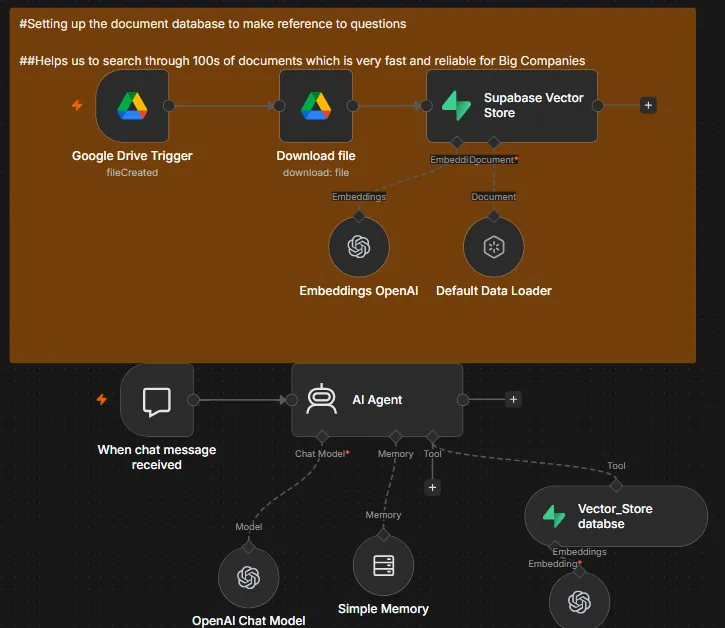
1.The n8n RAG workflow: Google Drive files are embedded into a Supabase vector store, and a chat agent searches it. 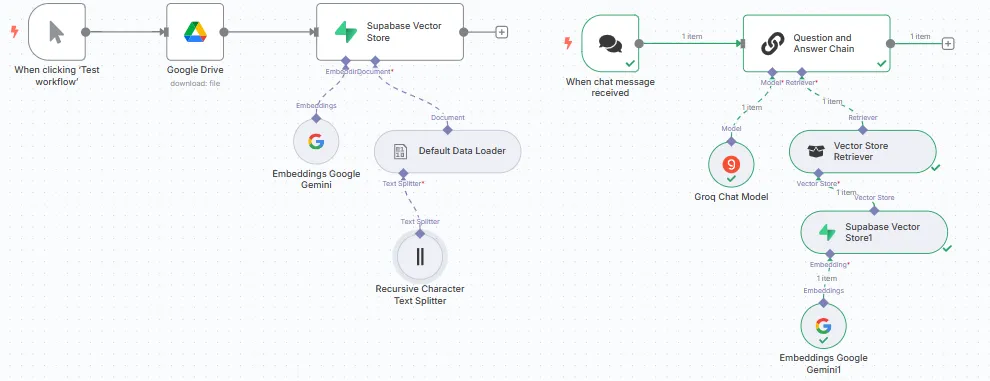
2.A Supabase build with Gemini embeddings, a text splitter and a question-and-answer chain with a vector store retriever. 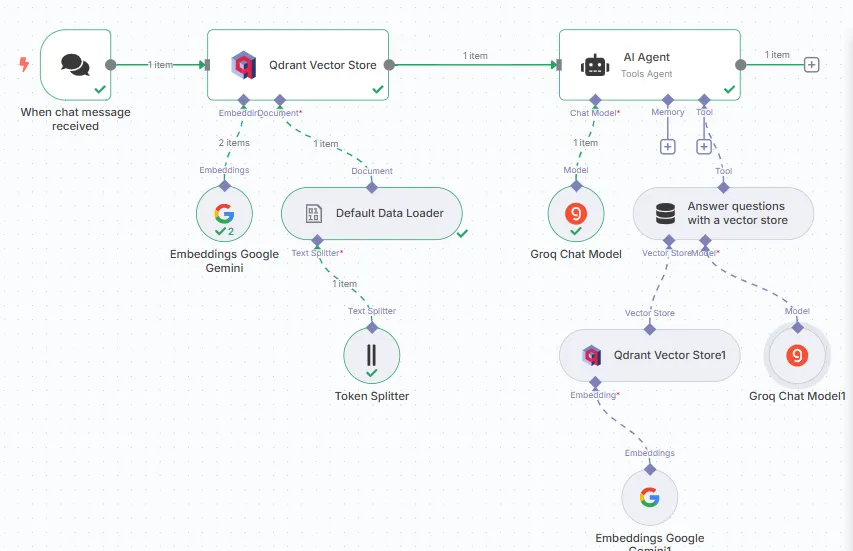
3.A Qdrant build: documents are split and embedded into Qdrant, and the chat agent answers through a vector store tool.
Project brief
Deliverables
- Google Drive ingestion with automatic download
- Document parsing to structured JSON with validation
- Text splitting and embeddings
- Vector store setup on Supabase and Qdrant
- Chat agent with memory and a vector store search tool
The challenge
The answers staff needed were buried in PDFs such as shipping documents, and finding them meant opening files one by one. A first version of the retrieval system worked on standard documents but became unreliable when a PDF had an unusual layout. The model was not the problem: the text going into the vector store was not consistently structured, so retrieval returned the wrong passages.
Our approach
A Google Drive trigger watches for new files, downloads each one and passes it through a data loader and text splitter. Each chunk is embedded with OpenAI or Google Gemini embeddings and written to the vector store. On the question side, a chat trigger feeds an AI agent that has a chat model, short-term memory and a vector store tool, so it pulls the most relevant passages before it answers. To fix the unreliable documents, we added a dedicated parsing layer in front of the store: documents are converted to structured JSON, the extracted information is checked before it moves on, and only validated content is indexed. Document processing and retrieval are kept as separate stages, which makes each one easier to test.
The outcome
Staff ask a question in plain language and get an answer based on the company's own documents, including PDFs that do not follow a standard layout. New files become searchable as soon as they land in the Drive folder.
- Trigger
- New Drive file or a chat message
- Stack
- n8n, Supabase, Qdrant, OpenAI, Gemini
- Handles
- Parsing, embedding and document Q&A
How we did it
Step 01
Review the documents
We looked at the PDFs that produced wrong answers and traced the problem to inconsistent structure going into the index.
Step 02
Build ingestion
We set up the Drive trigger, splitter, embeddings and vector store so new files are indexed automatically.
Step 03
Add structured parsing
We added a parsing stage that outputs structured JSON and validates it before anything reaches retrieval.
Step 04
Connect the chat agent
We gave the agent memory and a vector store search tool, then tested it against the questions staff ask day to day.
Tools and platforms
- n8n
- Supabase
- Qdrant
- OpenAI
- Google Gemini
- Google Drive
Why this project matters
Better AI answers usually start before the model sees anything. Cleaning and checking the documents going in did more for accuracy than rewriting the prompt.
Questions about this project
Will it answer questions that are not covered by our documents?
The agent searches the vector store first and answers from what it finds. We write its instructions so it says when the documents do not cover a question instead of guessing, and we test that behavior before handover.
Can you build something similar for my business?
Yes. We adapt the workflow to the tools and process you already use, and we give you a fixed quote after a short call about what you need.
Related services and articles
Have a project like this in mind?
Tell us what you're working on. We'll come back with a clear plan and a realistic timeline.