

Nurse hire onboarding pipeline in GoHighLevel
We built this onboarding system in GoHighLevel for a wellness provider that hires registered nurses. A new hire form starts the workflow, which tags the contact, opens an opportunity in the Hired stage, sends the first email, creates a Google Drive folder through Zapier and sends the contract for electronic signature. From there the workflow assigns tasks to HR, operations and finance, waits for each one to be marked done, and moves the new hire through the onboarding pipeline until they reach Active Provider.
- Practice
- AI Automation
- Service
- Content & Operations
- Type
- Client automation
The work
How the automation works
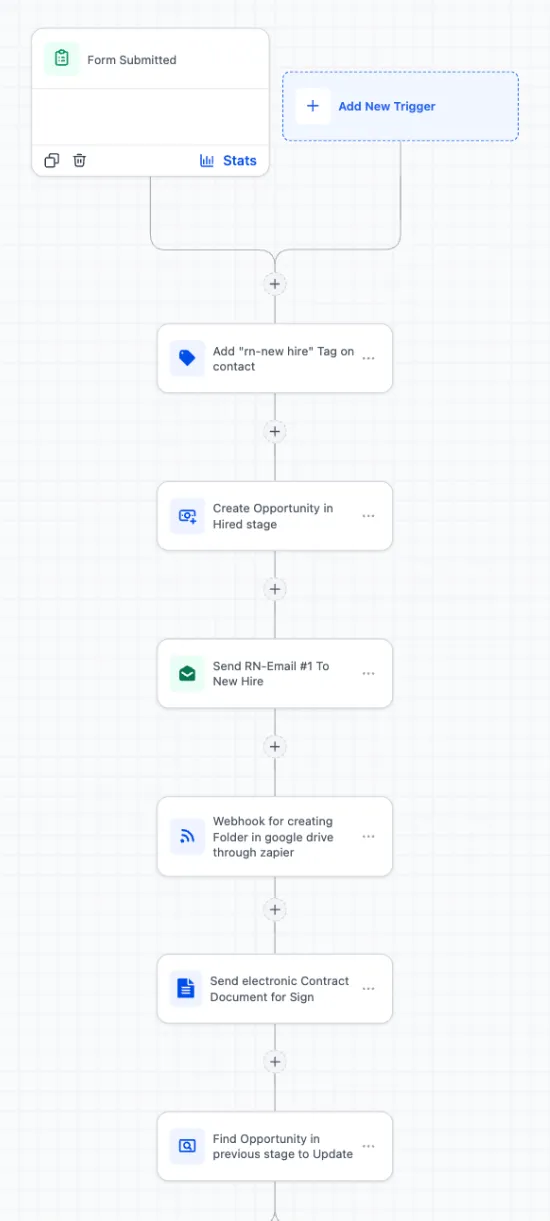
1.The start of the onboarding workflow: form trigger, new hire tag, Hired opportunity, first email, Drive folder webhook and e-sign contract. 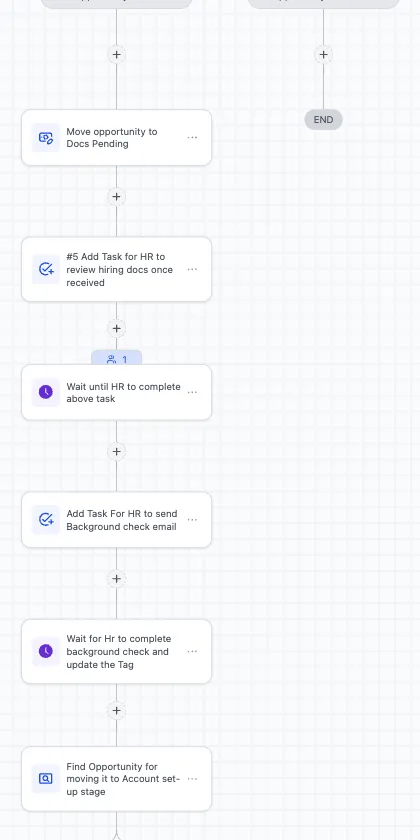
2.The document review and background check steps, where the workflow waits for HR to finish each task. 
3.Later stages of the onboarding pipeline: Training Ready, Field Training, Active Provider and On Hold.
Project brief
Deliverables
- Onboarding pipeline from Hired to Active Provider, plus On Hold
- Main onboarding workflow with tag and task based wait steps
- Zapier webhook that creates a Google Drive folder per hire
- Electronic contract sent for signature on day one
- Task templates for HR, operations and finance
- Timed onboarding and training email sequence
The challenge
Onboarding a nurse involves paperwork, a background check, account setup, vendor registration and training, handled by several people. Without a shared system nobody can see where each new hire stands, follow-ups depend on memory, and a missed step can delay a nurse's first shift.
Our approach
The workflow is triggered by the new hire form. It adds an rn-new hire tag, creates an opportunity in the Hired stage, sends the first onboarding email, calls a Zapier webhook that creates the new hire's Google Drive folder, and sends the employment contract for signature. It then finds the opportunity and moves it to Docs Pending, creates a task for HR to review the hiring documents, and pauses until that task is complete. Next it creates a background check task and waits until HR updates the tag. The opportunity moves to Set Up Accounts, where tasks go out for email, system and vendor accounts, with wait steps for each confirmation tag. After timed delays, training emails go out and the opportunity advances through Training Ready and Field Training to Active Provider, where temporary tags are cleared and an active tag is added. An On Hold stage catches anyone who needs to pause.
The outcome
Leadership can open one pipeline and see every new hire's stage. HR, operations and finance get their tasks automatically, the workflow only moves forward when the previous step is confirmed, and every nurse receives the same emails, documents and training sequence.
- Trigger
- New hire form submission
- Stack
- GoHighLevel, Zapier, Google Drive
- Handles
- Docs, background check, accounts, training
How we did it
Step 01
Map the onboarding steps
We wrote down every step from offer to first shift and who owns it across HR, operations and finance.
Step 02
Design the pipeline and tags
We turned those steps into pipeline stages and a set of tags that mark each step as done.
Step 03
Build the workflow
We built the main workflow with tasks, wait conditions, the Drive folder webhook and the e-sign contract step.
Step 04
Test with a sample hire
We ran a test hire through every stage, checked each task and email, and adjusted the wait timings.
Tools and platforms
- GoHighLevel
- Zapier
- Google Drive
Why this project matters
In healthcare staffing, slow onboarding means shifts go unfilled. A tracked, task-driven process shortens the gap between hire and first shift and keeps compliance steps from being skipped.
Questions about this project
Can staff still handle exceptions by hand?
Yes. Team members complete tasks and update tags as they normally would, and the On Hold stage lets them pause a hire without breaking the workflow.
Can you build something similar for my business?
Yes. We adapt the stages, tasks and emails to your roles, tools and onboarding steps. After a short call we send a fixed quote.
Related services and articles
Have a project like this in mind?
Tell us what you're working on. We'll come back with a clear plan and a realistic timeline.