

AI LinkedIn posting agent with research and generated images
We built this workflow for a client who wanted a steady LinkedIn presence without writing and designing every post by hand. Topics live in a Google Sheet. The workflow picks up a row, researches the subject on the web, writes the post, generates a matching image with a FLUX model on Hugging Face, publishes to LinkedIn and marks the row as done.
- Practice
- AI Automation
- Service
- Content & Operations
- Type
- Client automation
The work
How the automation works

1.The n8n workflow: a topic row feeds a research agent, an image agent, Hugging Face image generation, the LinkedIn post and a sheet update. 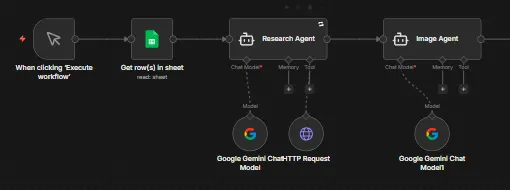
2.Close-up of the research agent with Gemini and a Tavily search tool, followed by the image prompt agent.
Project brief
Deliverables
- Google Sheets topic queue with status write-back
- Research agent on Gemini with a Tavily web search tool
- Image prompt agent that matches visuals to each post
- FLUX image generation on Hugging Face with file conversion
- LinkedIn publishing step for post text and image
The challenge
Posting on LinkedIn every week takes more time than it looks: someone has to research the topic, write copy that sounds informed, find or design an image and then publish it. When the team gets busy, the posting schedule is the first thing to slip.
Our approach
The run starts by reading the next topic row from Google Sheets. A research agent on Google Gemini calls the Tavily search API through an HTTP tool, gathers current information and drafts the post. A second Gemini agent turns the post into an image prompt. An HTTP request sends that prompt to a FLUX model on Hugging Face, and the returned Base64 data is converted into an image file. The LinkedIn node publishes the post with the image, a short code step tidies the result, and the workflow writes the status back to the sheet.
The outcome
The client now adds topics to a sheet and gets finished LinkedIn posts with original images, published from one workflow. The sheet doubles as a content calendar and a record of what has gone out.
- Trigger
- Topic row in Google Sheets
- Stack
- n8n, Gemini, Tavily, Hugging Face, LinkedIn
- Handles
- Research, post copy, image and publishing
How we did it
Step 01
Map the content flow
We agreed how topics are queued in the sheet and what a finished post should include.
Step 02
Build the research agent
We connected Gemini to Tavily search so each post draws on current information rather than model memory alone.
Step 03
Add image generation
A second agent writes an image prompt, and the FLUX model on Hugging Face renders it into a file LinkedIn accepts.
Step 04
Publish and log
We wired the LinkedIn post step and the sheet update, then tested runs end to end.
Tools and platforms
- n8n
- Google Gemini
- Tavily
- Hugging Face FLUX
- Google Sheets
Why this project matters
Consistent posting is what makes LinkedIn work for a business, and this workflow keeps the posts coming even when nobody has time to write them.
Questions about this project
Can I review posts before they go live?
Yes. We can add an approval step, for example a status column in the sheet or a Slack message, so a post is only published once someone signs off.
Can you build something similar for my business?
Yes. We adapt the workflow to your tools and process, including your preferred AI model and image style, and give you a fixed quote after a short call.
Related services and articles


Have a project like this in mind?
Tell us what you're working on. We'll come back with a clear plan and a realistic timeline.