

Eight-stage client journey for a life insurance practice
We designed and built this workflow for a life insurance advisory practice that wanted every client to move through the same steps, from first inquiry to annual review. The practice uses Zoho CRM, keeps client documents in Box and records meetings with an AI notetaker. The workflow is laid out as eight stages, each started by its own webhook. Several stages are set up as request templates that are completed as each account is connected, so this page describes the design stage by stage.
- Practice
- AI Automation
- Service
- Lead Generation & CRM
- Type
- Client automation
The work
How the automation works
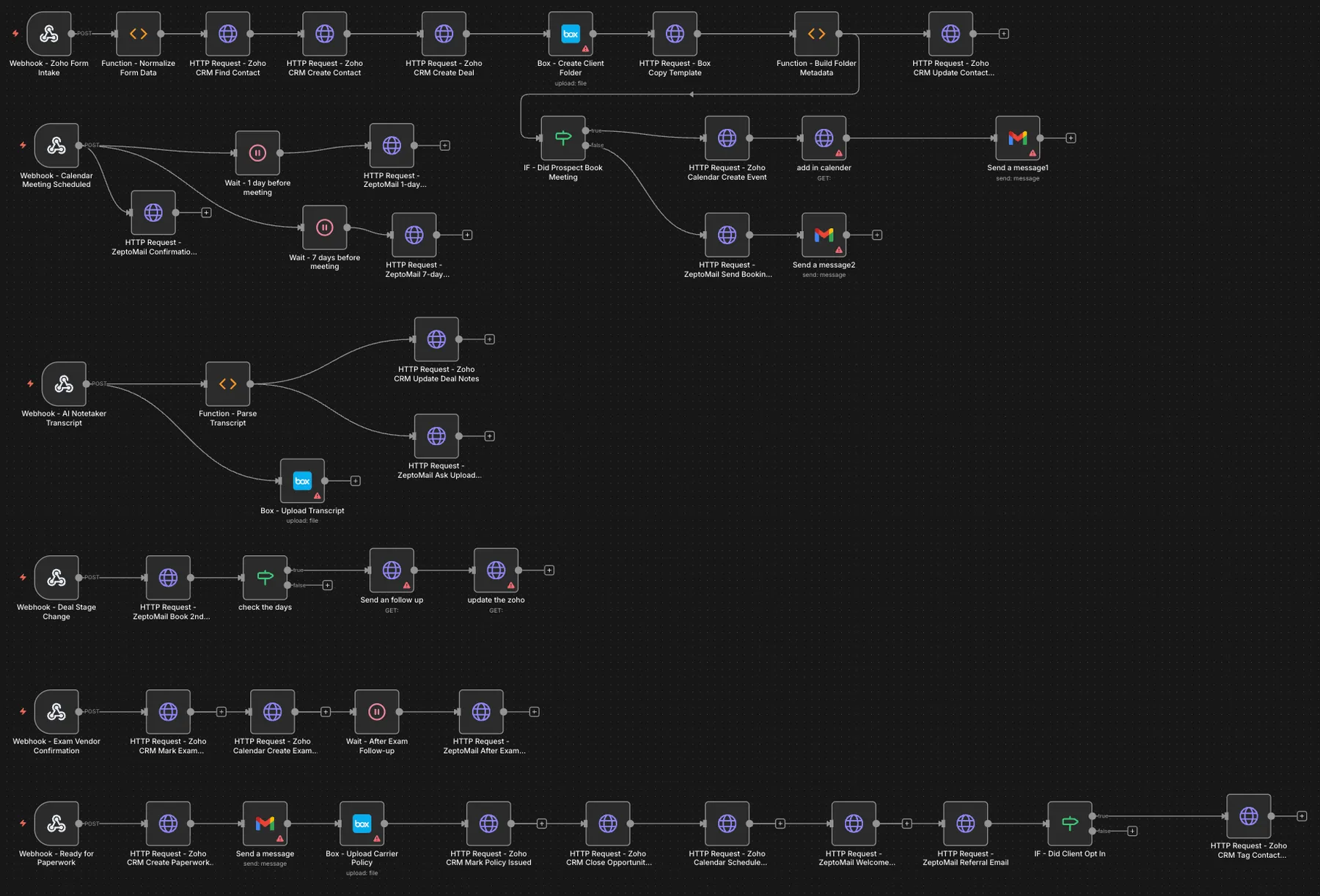
1.The full n8n design: the client journey laid out as separate webhook-triggered rows, from form intake to post-sale tagging. 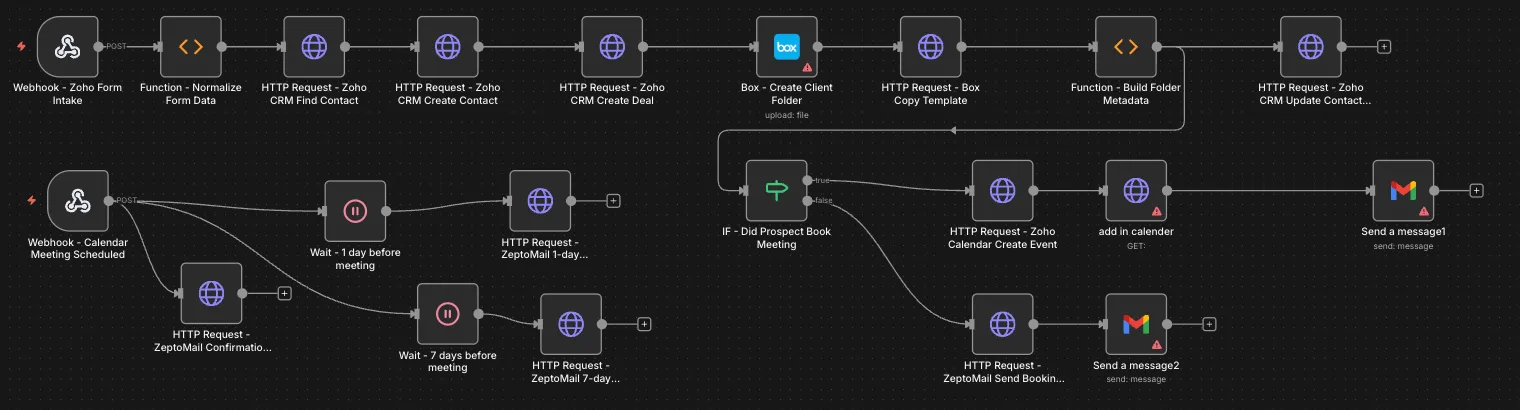
2.Intake to Zoho CRM contact and deal, Box folder and template copies, a booking check, and meeting confirmation with 7-day and 1-day reminders. 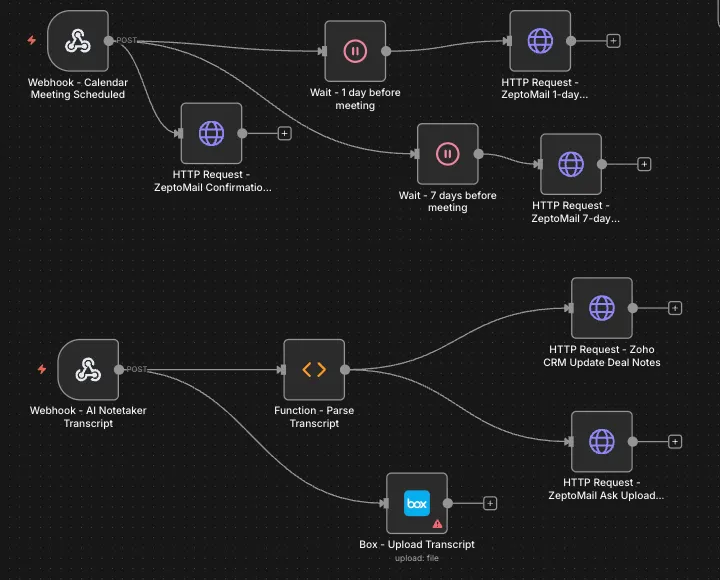
3.Meeting reminders and the AI notetaker branch, which parses the transcript, saves it to Box and updates the deal notes. 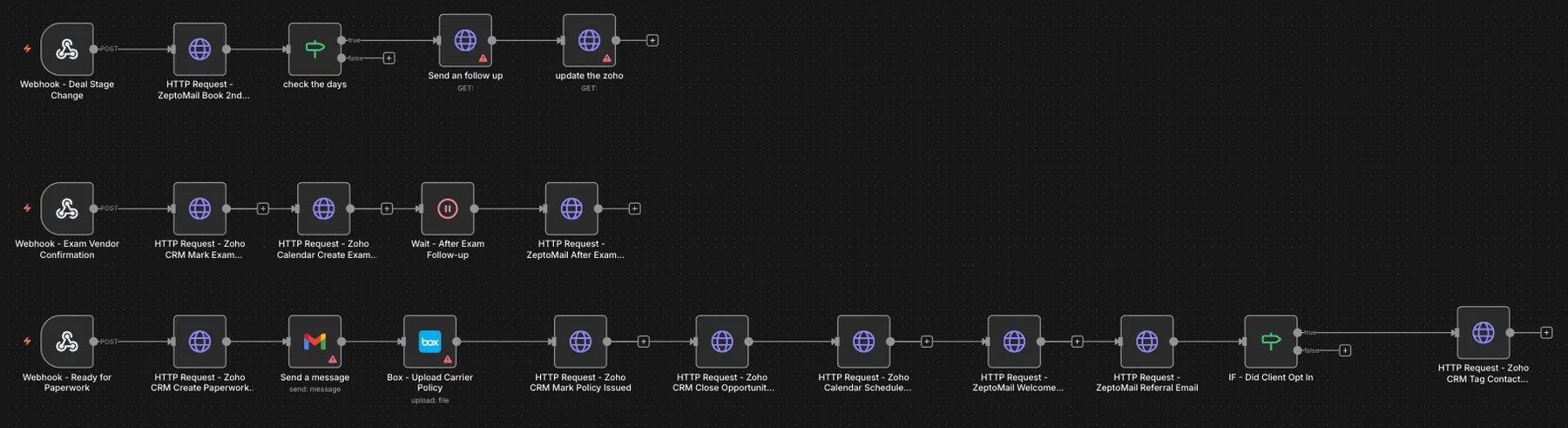
4.Later stages: second-meeting booking, exam vendor confirmation with follow-up, and paperwork through policy issue, closed-won, annual review and referral emails.
Project brief
Deliverables
- Intake to a Zoho CRM contact and deal
- Box client folder with template documents
- Meeting confirmation with 7-day and 1-day reminders
- AI notetaker transcript to CRM notes and Box
- Medical exam scheduling and follow-up
- Policy issue, closed-won deal and post-sale emails
The challenge
A life insurance sale comes with a long trail of admin: intake forms, compliance documents, two or more meetings, possible medical exams, carrier paperwork and follow-up after the policy is issued. Advisors often track this in their heads or in scattered notes, so reminders go out late, documents end up in the wrong place, and post-sale steps such as annual reviews and referral requests get skipped.
Our approach
Stage 1 takes the intake form through a webhook, normalizes the data, finds or creates the contact and a deal in Zoho CRM, creates a Box folder for the client, copies in template documents such as the fact finder and HIPAA form, and saves the folder link on the contact. It then checks whether the prospect booked a meeting: if so, it creates the calendar event; if not, it emails a booking link. Stage 2 starts when a meeting is scheduled, sends a confirmation and waits to send reminders 7 days and 1 day before the meeting. Stage 3 receives the AI notetaker transcript, parses it, saves it to Box, adds the notes to the Zoho deal and asks the client to upload their documents. Stage 4 reacts to deal stage changes, emailing a booking link for the second meeting and following up if nothing is booked. Stage 5 handles medical exams: when the exam vendor confirms, the deal is marked and a calendar event created, with a follow-up email after the exam, and the design adds reminders on day 3 and day 7 while an exam is still outstanding. Stages 6 to 8 cover second-meeting preparation, paperwork and post-sale: a paperwork task, the carrier policy uploaded to Box, the policy marked issued, the deal closed as won, an annual review scheduled, a welcome email and referral request sent, and clients who opt in tagged for marketing.
The outcome
The practice has one map of its client journey in n8n, with each stage tied to an event it already produces: a form, a booking, a transcript, a deal stage or a vendor confirmation. As each stage is connected, clients get reminders on time, documents land in the right Box folder, meeting notes reach the CRM, and post-sale steps like the annual review and referral request happen without anyone having to remember them.
- Trigger
- Intake form, bookings and deal stages
- Stack
- n8n, Zoho CRM, Box, ZeptoMail
- Handles
- Eight stages from intake to annual review
How we did it
Step 01
Map the journey
We broke the practice's client process into eight stages and named the trigger and the output of each one.
Step 02
Build the intake stage
We connected the intake form to Zoho CRM and Box, including the folder naming convention and template documents.
Step 03
Lay out stages 2 to 8
We built each later stage as its own webhook-triggered branch with waits, conditions and email steps.
Step 04
Connect stage by stage
Each stage is linked to the live accounts and tested with a sample client before the next one is switched on.
Tools and platforms
- n8n
- Zoho CRM
- Box
- ZeptoMail
- Zoho Calendar
- Gmail
Why this project matters
In insurance, a missed reminder or a misplaced form can hold up a policy. Laying the whole journey out as one workflow makes every step visible and repeatable.
Questions about this project
Can it work with AgencyBloc or HubSpot instead of Zoho?
Yes. The CRM steps are API calls, so they can point at AgencyBloc, HubSpot or another CRM, while the Box, email and meeting steps stay the same.
Can you build something similar for my business?
Yes. We start from your own client stages and the CRM and document tools you use, then build the journey around them. You get a fixed quote after a short call.
Related services and articles
Have a project like this in mind?
Tell us what you're working on. We'll come back with a clear plan and a realistic timeline.