

Invoice processing agent with Gemini and Google Sheets
We built this invoice workflow for a small finance and back-office team that receives supplier invoices as PDF files. When a new invoice is saved to a Google Drive folder, n8n reads the PDF text, uses Google Gemini to pull out the fields the team tracks, adds them to a Google Sheet and sends an email about the invoice through Gmail.
- Practice
- AI Automation
- Service
- Content & Operations
- Type
- Client automation
The work
How the automation works

1.The n8n workflow: Drive trigger, PDF text extraction, Gemini field extraction, Sheets log, AI email and Gmail. 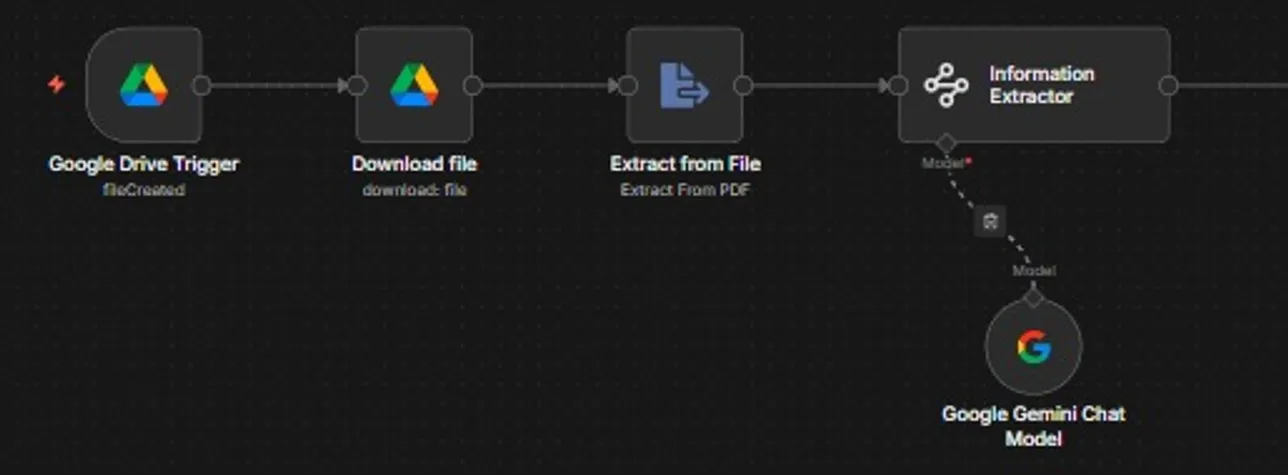
2.Intake: a new Drive file is downloaded, its PDF text extracted and read by a Gemini information extractor. 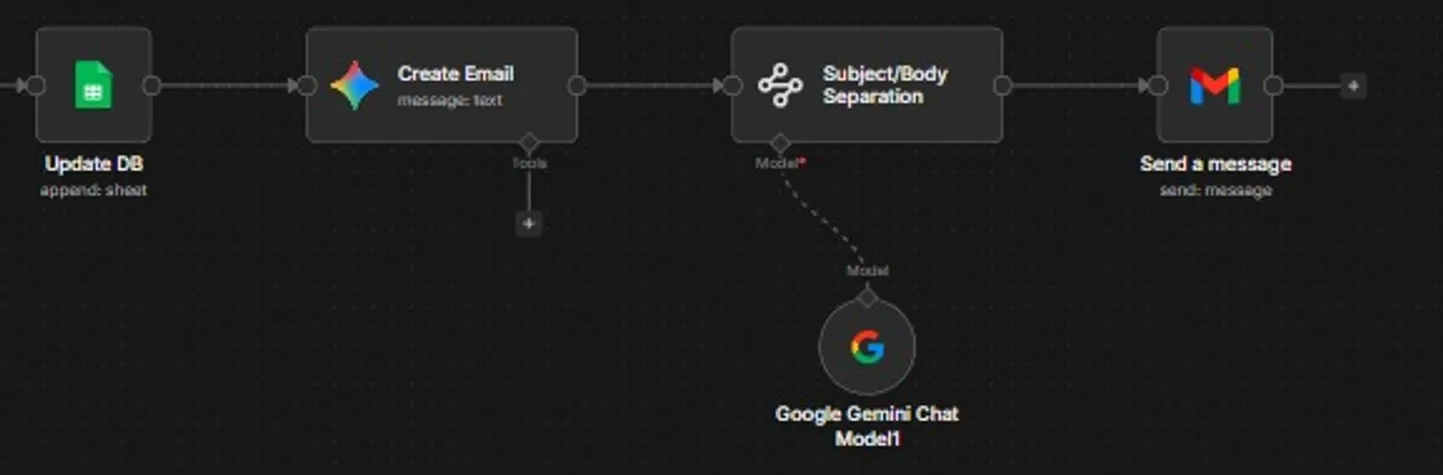
3.Output: the invoice row is added to the sheet, Gemini drafts an email and Gmail sends it.
Project brief
Deliverables
- Google Drive folder trigger and file download
- PDF text extraction step
- Gemini information extractor with a fixed field schema
- Google Sheets invoice log
- Gemini-written email split into subject and body
- Gmail send step
The challenge
Each invoice had to be opened, read and typed into a spreadsheet before anyone could approve or query it. The work was repetitive, easy to fall behind on at month end, and small typing mistakes in amounts or dates were hard to spot later.
Our approach
A Google Drive trigger fires when a new file is created in the invoices folder, and the workflow downloads it. An Extract from File step pulls the text out of the PDF. An Information Extractor node running on a Google Gemini chat model reads that text and returns the invoice details the team needs, such as supplier, invoice number, dates and amounts, in a fixed structure. Those fields are appended as a new row in the Google Sheet that serves as the invoice log. Gemini then drafts an email about the invoice, a second extractor step separates the subject from the body, and Gmail sends it.
The outcome
Invoices are logged as soon as they are saved to Drive, in the same format every time, and the team gets an email for each one without opening the PDF. Staff review the sheet instead of retyping it.
- Trigger
- New PDF in a Google Drive folder
- Stack
- n8n, Google Gemini, Google Sheets, Gmail
- Handles
- Text extraction, field capture, email notice
How we did it
Step 01
Agree the fields
We listed the invoice details the team records and the format each one should take in the sheet.
Step 02
Build extraction
We set up PDF text extraction and the Gemini extractor, and tested it on invoices laid out in different ways.
Step 03
Log and notify
We connected Google Sheets for the log and wrote the email prompt so each message reads clearly.
Step 04
Hand over
We documented the folder, sheet and email setup so the team can adjust the fields as their needs change.
Tools and platforms
- n8n
- Google Gemini
- Google Drive
- Google Sheets
- Gmail
Why this project matters
Invoices are small tasks that pile up quickly. Capturing each one the moment it arrives keeps the payables list current and leaves the team free for the checks that need a person.
Questions about this project
Will it work with scanned paper invoices?
This build reads the text layer of digital PDFs. Scanned invoices have no text layer, so for those we add a text recognition step before extraction; the rest of the workflow stays the same.
Can you build something similar for my business?
Yes. We adapt the workflow to the tools and process you already use, and we give you a fixed quote after a short call about what you need.
Related services and articles


Have a project like this in mind?
Tell us what you're working on. We'll come back with a clear plan and a realistic timeline.