

Inquiry-to-invoice automation for a creative studio
We built this for a creative studio that sells project-based work. Every project followed the same path from inquiry email to discovery call, proposal, contract and invoice, but each step was done by hand across email, a pricing sheet, the CRM and the accounting software. An earlier version of the same flow used Airtable as its lead and proposal database.
- Practice
- AI Automation
- Service
- Content & Operations
- Type
- Client automation
The work
How the automation works
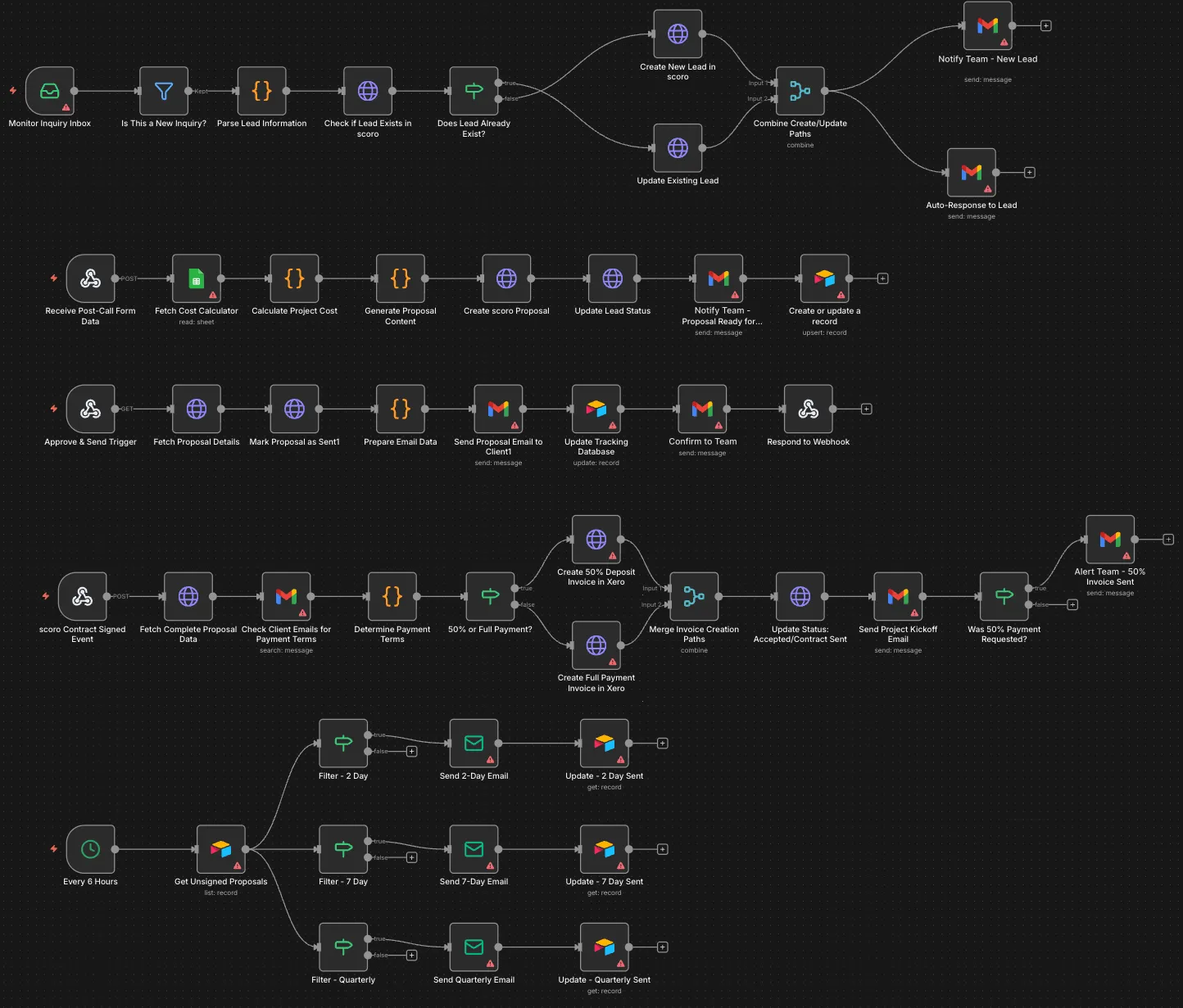
1.The full n8n workflow in five rows: lead intake, proposal preparation, approval and send, contract-signed invoicing, and follow-ups. 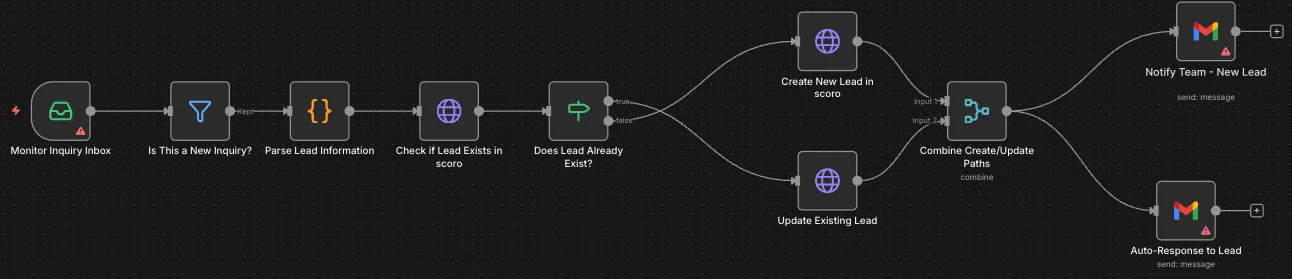
2.Lead intake: inbox monitor, new-inquiry filter, lead parsing, Scoro lookup, create or update, then a team notification and an auto-reply. 
3.Contract signed: the payment terms decide between a 50% deposit and a full Xero invoice, then a status update, kickoff email and team alert. 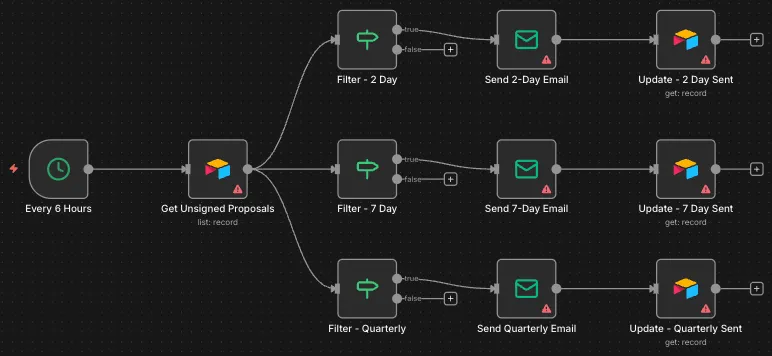
4.Follow-ups: every 6 hours unsigned proposals are filtered into 2-day, 7-day and quarterly emails, each updating its tracking record. 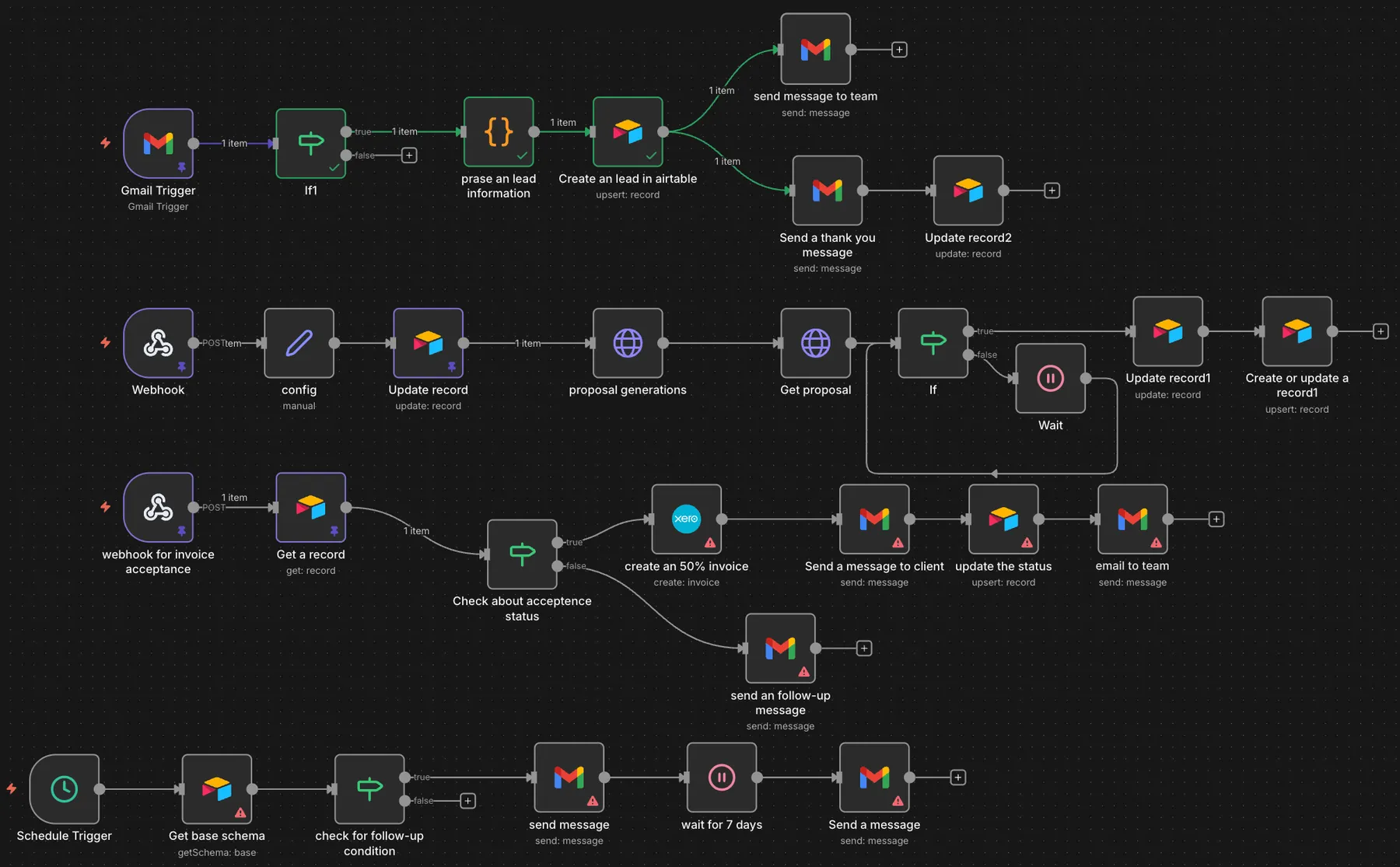
5.An earlier version of the flow built on Airtable, with Gmail lead intake, proposal generation, a Xero invoice and a follow-up sequence.
Project brief
Deliverables
- Inbox monitoring with lead parsing and a duplicate check in Scoro
- Auto-reply with a discovery call booking link
- Cost calculation and proposal creation in Scoro
- Approval trigger that sends the proposal and logs it
- Contract-signed flow with deposit or full invoices in Xero
- Scheduled follow-ups for unsigned proposals
The challenge
For a studio, the admin between a first email and a paid deposit is easy to underestimate: replying quickly, booking a call, pricing the job, writing the proposal, chasing a signature, raising the right invoice and starting the project. Each handoff is a chance for a lead to go cold or for an invoice to go out with the wrong terms, and proposals that never get signed tend to be forgotten.
Our approach
The workflow runs in five stages. First, n8n monitors the inquiry inbox, filters for new inquiries, parses the lead's details and checks Scoro for an existing record, then creates or updates the lead. The lead gets an auto-reply with a link to book a discovery call, and the team gets a notification. Second, after the call a form posts to a webhook; n8n pulls rates from a cost calculator sheet, calculates the project cost in code, generates the proposal content, creates the proposal in Scoro, updates the lead status and tells the team it is ready for review. Third, approving the proposal fires a trigger that fetches it, prepares the email, sends it to the client, marks it as sent and records it in an Airtable tracking table. Fourth, when Scoro reports a signed contract, n8n works out the payment terms and creates either a 50% deposit invoice or a full payment invoice in Xero, updates the status, sends the kickoff email and alerts the team when a deposit invoice has gone out. Fifth, a scheduled check every 6 hours finds unsigned proposals and sends 2-day, 7-day and quarterly follow-ups, updating the tracking record after each one.
The outcome
The studio's sales admin now runs as one connected flow. New inquiries get a reply and a booking link straight away, proposals are priced and drafted from the call details, and signed contracts produce the right Xero invoice and a kickoff email. Unsigned proposals are followed up on a schedule, and the team is told at the points where a person needs to act.
- Trigger
- Inquiry email through to signed contract
- Stack
- n8n, Scoro, Xero, Airtable, Gmail
- Handles
- Leads, proposals, invoices and follow-ups
How we did it
Step 01
Map the sales path
We documented each step from inquiry to kickoff and marked where a person still needs to approve or decide.
Step 02
Build lead intake
We connected the inbox, the Scoro lead lookup, the auto-reply and the team notifications.
Step 03
Automate proposals and invoices
We added the cost calculation, Scoro proposals, the approval flow and Xero invoicing based on the agreed payment terms.
Step 04
Add follow-ups and test
We set up the 6-hour follow-up check and ran test leads through every branch before handover.
Tools and platforms
- n8n
- Scoro
- Xero
- Airtable
- Gmail
- Google Sheets
Why this project matters
Most of the work between an inquiry and a paid deposit repeats from project to project. Automating it lets a small studio reply fast and invoice correctly without adding admin hours.
Questions about this project
We use a different CRM. Can this still work?
Yes. The first version of this flow ran on Airtable and the current one runs on Scoro. Any CRM with an API for leads and proposals can take Scoro's place, and Xero can be swapped for another accounting tool.
Can you build something similar for my business?
Yes. We map your own inquiry, proposal and invoicing steps and connect the tools you already pay for. After a short call we send a fixed quote.
Related services and articles
Have a project like this in mind?
Tell us what you're working on. We'll come back with a clear plan and a realistic timeline.