

AI customer feedback triage with Airtable, Slack and Gmail
We built this workflow for a product business that collects customer feedback through a web form. An AI agent on Azure OpenAI reads each submission and decides what kind of feedback it is. The workflow then stores it in a matching Airtable table, posts compliments and feature requests to Slack, and sends complaints an email reply through Gmail.
- Practice
- AI Automation
- Service
- AI Agents & Chatbots
- Type
- Client automation
The work
How the automation works
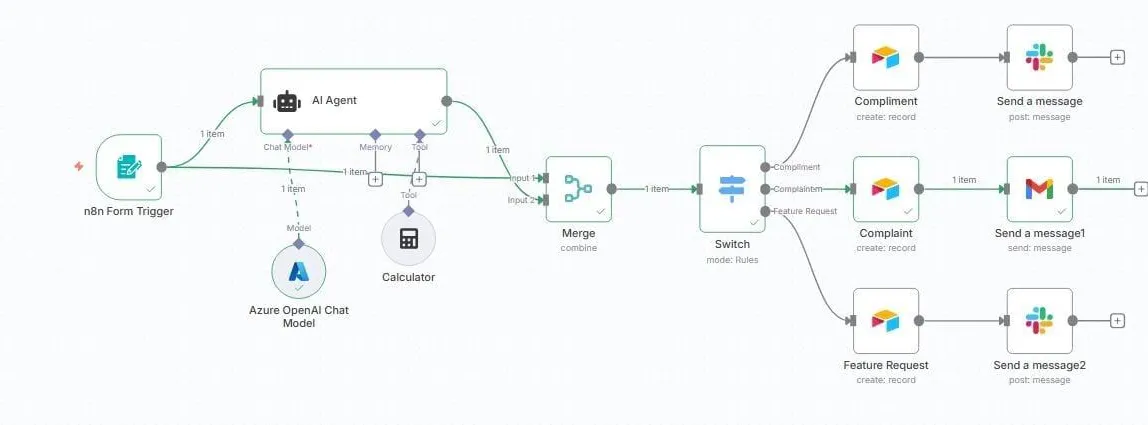
1.The n8n workflow: form trigger, Azure OpenAI agent, Switch by feedback type, Airtable records, then Slack or Gmail. 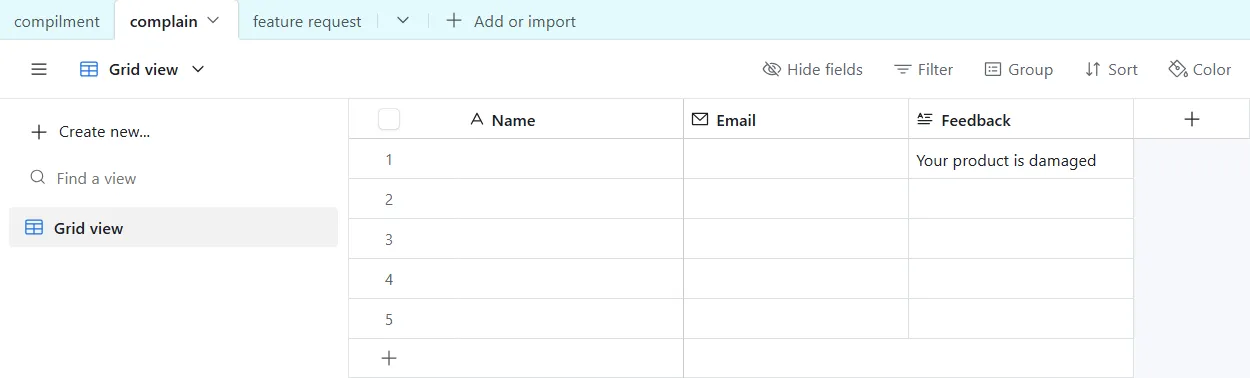
2.The Airtable base with a table per feedback type, showing a test complaint (name and email covered).
Project brief
Deliverables
- n8n feedback form with name, email and message
- Azure OpenAI classification agent
- Switch routing by feedback type
- Airtable base with a table per feedback type
- Slack alerts and Gmail replies to complaints
The challenge
Feedback forms fill up with a mix of praise, complaints and ideas. Someone has to read each entry, decide who should see it and log it somewhere useful, and unhappy customers can wait days for a response.
Our approach
An n8n form trigger captures the customer's name, email and message. An AI agent running on an Azure OpenAI chat model classifies the feedback. A merge step joins the classification with the original form data, and a Switch node routes it by type. Each branch creates a record in its own Airtable table for compliments, complaints or feature requests. Compliments and feature requests are posted to Slack for the team, while complaints trigger a Gmail message back to the customer.
The outcome
Every piece of feedback is now sorted and filed as it arrives, the team sees praise and ideas in Slack, and customers with a complaint get an email response straight away.
- Trigger
- Feedback form submission
- Stack
- n8n, Azure OpenAI, Airtable, Slack, Gmail
- Handles
- Compliments, complaints and feature requests
How we did it
Step 01
Define the feedback types
We agreed on three categories and what should happen to each one.
Step 02
Set up storage
We built an Airtable base with separate tables for compliments, complaints and feature requests.
Step 03
Classify and route
We configured the Azure OpenAI agent and a Switch node to send each entry down the right branch.
Step 04
Notify and test
We connected Slack and Gmail, then tested each branch with sample feedback.
Tools and platforms
- n8n
- Azure OpenAI
- Airtable
- Slack
- Gmail
Why this project matters
Fast replies to complaints and a clean record of feature requests both depend on sorting feedback the moment it arrives.
Questions about this project
Can it pull feedback from email or reviews instead of a form?
Yes. The trigger can be swapped for an inbox, a review platform or a helpdesk, and the classification and routing stay the same.
Can you build something similar for my business?
Yes. We adapt the workflow to your tools and process, including your own feedback categories, and give you a fixed quote after a short call.
Related services and articles
Have a project like this in mind?
Tell us what you're working on. We'll come back with a clear plan and a realistic timeline.