

Scheduled AI blog writer with images and auto-publishing
We built this workflow for a client who wanted a regular flow of blog articles without a manual writing and upload routine. On a schedule, the workflow takes the next topic from a Google Sheet, has Gemini write the article, pulls out the title and body as structured data, generates a cover image and publishes the post through the blog's API.
- Practice
- AI Automation
- Service
- Content & Operations
- Type
- Client automation
The work
How the automation works

1.The n8n workflow: schedule trigger, topic row, Gemini writer, information extractor, image generation, blog API post and sheet update. 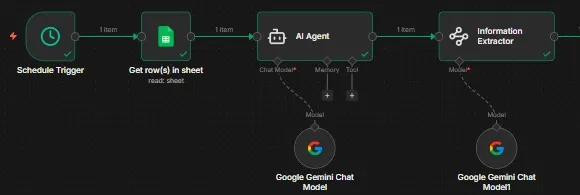
2.Close-up of the writing agent and the information extractor, each running on a Gemini chat model.
Project brief
Deliverables
- Scheduled trigger reading a Google Sheets topic list
- Gemini writing agent for full articles
- Information extractor that structures title and body
- Hugging Face cover image generation and file conversion
- Publishing step that posts to the blog's API and updates the sheet
The challenge
A company blog only helps when it is updated regularly, but writing, formatting, sourcing an image and uploading each article is slow work. Posts get delayed, and the blog goes quiet for weeks at a time.
Our approach
A schedule trigger starts each run and reads the next row from Google Sheets. An AI agent on Google Gemini writes the full article. An information extractor, also running on Gemini, splits the output into clean fields such as title and body so the blog receives exactly what it expects. An HTTP request generates a cover image through Hugging Face, and the Base64 response is converted into an image file. A code step assembles the payload, an HTTP request posts the article to the blog's API, and the sheet row is updated with the result.
The outcome
The blog now receives new articles on a fixed schedule, each with its own cover image, while the sheet shows which topics have been published and which are still waiting.
- Trigger
- Schedule plus a topic sheet
- Stack
- n8n, Gemini, Hugging Face, blog API
- Handles
- Writing, structuring, image and upload
How we did it
Step 01
Agree the post format
We confirmed which fields the blog's API needs and how topics are listed in the sheet.
Step 02
Write and structure
We set up the Gemini writer and an extractor so every article arrives in the same clean structure.
Step 03
Generate the cover
We added image generation on Hugging Face and converted the result into a file the blog accepts.
Step 04
Publish on schedule
We connected the blog API call and sheet update, then tested scheduled runs.
Tools and platforms
- n8n
- Google Gemini
- Hugging Face
- Google Sheets
- REST API
Why this project matters
A blog that is updated on schedule keeps a site fresh for readers and search engines, and this workflow removes the manual steps that usually cause delays.
Questions about this project
Does it work with WordPress or another CMS?
Yes. The publishing step is an API call, so we can point it at WordPress, Webflow, a headless CMS or a custom backend.
Can you build something similar for my business?
Yes. We adapt the workflow to your tools and process, and give you a fixed quote after a short call.
Related services and articles


Have a project like this in mind?
Tell us what you're working on. We'll come back with a clear plan and a realistic timeline.