

AI lead research and scoring with Hot, Warm and Cold alerts
We built this workflow for a B2B software company that wanted every inbound lead researched and scored before a salesperson picked it up. A lead is submitted through an n8n form. A researcher agent uses OpenAI with two Perplexity tools to look up the company's website and LinkedIn page, and returns structured fields. A second agent scores the lead from 1 to 100 against the client's criteria. The record is appended to Google Sheets, and a router sends a Hot, Warm or Cold email alert through Gmail.
- Practice
- AI Automation
- Service
- Lead Generation & CRM
- Type
- Client automation
The work
How the automation works
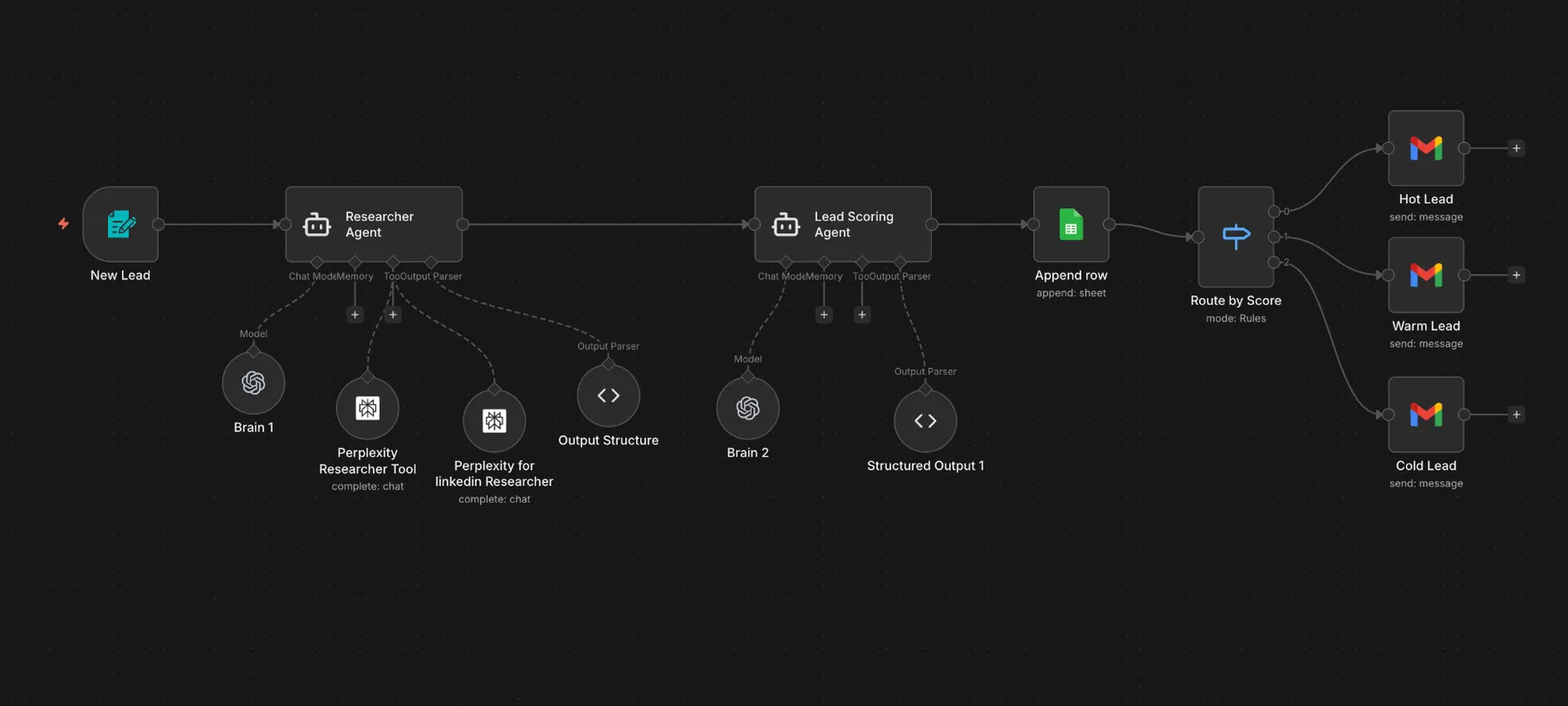
1.The n8n workflow: form trigger, researcher agent with Perplexity tools, scoring agent, Google Sheets, then Hot, Warm and Cold Gmail alerts. 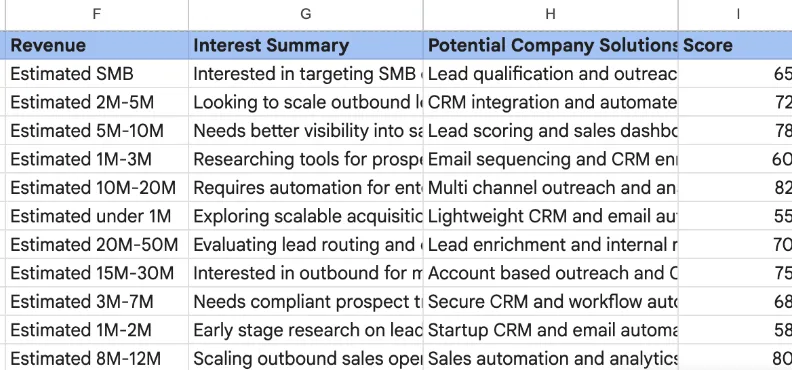
2.Test rows in the Google Sheet log, showing revenue band, interest summary, suggested solutions and the 1 to 100 score.
Project brief
Deliverables
- n8n lead intake form
- Researcher agent with website and LinkedIn Perplexity tools
- Lead scoring agent with custom criteria
- Structured output parsers for both agents
- Google Sheets lead log
- Score router with Hot, Warm and Cold Gmail alerts
The challenge
Without automation, sales reps spend the first part of every lead review on basic research: what the company sells, whether it is B2B, whether it has an API or an enterprise plan. That work is slow and inconsistent, and strong leads wait in the same queue as poor fits.
Our approach
The n8n form trigger collects the company and contact details. The researcher agent runs on an OpenAI chat model with memory and two Perplexity tools, one for the company website and one for LinkedIn. It returns the LinkedIn URL, domain, B2B or B2C market, lowest paid plan, latest case study, API availability, enterprise plan, free trial and up to five integrations, all through a structured output parser. The lead scoring agent, on a second OpenAI model, reads that research and returns a score from 1 to 100, again through a structured parser. A Google Sheets node appends the full record, and a Switch node routes by score to one of three Gmail nodes, each with its own alert template.
The outcome
Each submitted lead now arrives in the sales inbox already researched and scored, labeled Hot, Warm or Cold, with the same fields every time. The Google Sheet works as a running log of every lead and its score.
- Trigger
- n8n form submission
- Stack
- n8n, OpenAI, Perplexity, Sheets, Gmail
- Handles
- Research, 1 to 100 score, three alert tiers
How we did it
Step 01
Define the scoring criteria
We agreed with the client which company traits signal a good fit, such as B2B focus, API access and an enterprise plan.
Step 02
Build the research agent
We set up the Perplexity tools and a fixed output structure so every lead returns the same fields.
Step 03
Build scoring and routing
We wrote the scoring agent prompt, set the Hot, Warm and Cold thresholds and wrote the three alert emails.
Step 04
Test on sample leads
We ran test companies through the workflow and tuned prompts until scores and fields were consistent.
Tools and platforms
- n8n
- OpenAI
- Perplexity
- Google Sheets
- Gmail
Why this project matters
Research done the same way for every lead gives sales a fair comparison and a faster start on the best fits.
Questions about this project
Can the scores go into our CRM instead of a sheet?
Yes. The Google Sheets step can be swapped for HubSpot, Pipedrive, GoHighLevel or another CRM node, and the alerts can go to Slack instead of email.
Can you build something similar for my business?
Yes. We adapt the research fields, scoring rules and alerts to your market and tools. After a short call we send a fixed quote.
Related services and articles


Have a project like this in mind?
Tell us what you're working on. We'll come back with a clear plan and a realistic timeline.