

AI email assistant for inbox triage and drafted replies
We built this assistant for a client whose inbox mixed promotions, sign-up notices and real messages that needed answers. One workflow labels each new email as Promotion, Information, Signup or Others. The other reads incoming messages, has Gemini write a reply, separates the subject from the body and saves it as a Gmail draft so nothing is sent without approval.
- Practice
- AI Automation
- Service
- AI Agents & Chatbots
- Type
- Client automation
The work
How the automation works
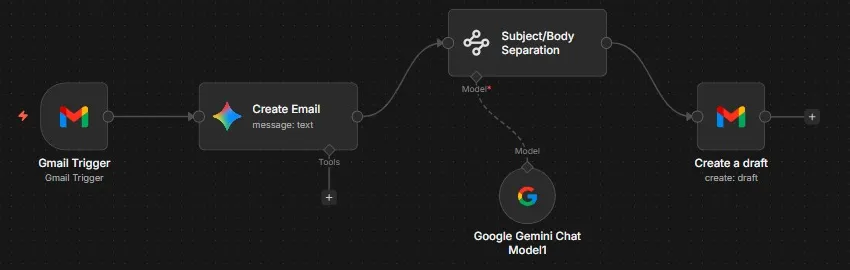
1.Reply drafting: a Gmail trigger passes each email to Gemini, an extractor splits subject and body, and Gmail saves a draft. 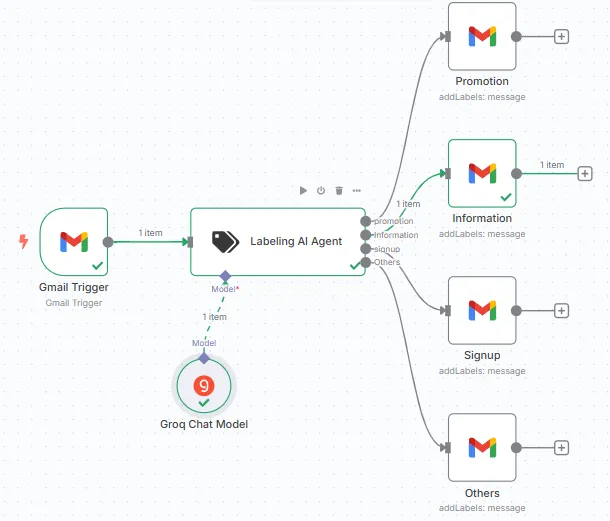
2.Inbox triage: a Groq-powered labeling agent sorts each new email into Promotion, Information, Signup or Others.
Project brief
Deliverables
- Gmail trigger for incoming messages
- Groq-based labeling agent with four categories
- Label actions for Promotion, Information, Signup and Others
- Gemini reply writer with subject and body extraction
- Gmail draft creation for human approval
The challenge
A busy inbox buries the messages that matter under newsletters and notifications, and writing replies from scratch takes up a large part of the day. Fully automatic replies are risky, so the client wanted help with both sorting and drafting while keeping a person in control.
Our approach
For triage, a Gmail trigger passes each new message to a labeling AI agent running on a Groq chat model. The agent picks one of four categories, and a matching Gmail node applies the Promotion, Information, Signup or Others label. For replies, a second Gmail trigger sends the message to Google Gemini, which writes a response. An information extractor on Gemini splits that response into subject and body, and a Gmail node creates a draft in the same account for someone to check and send.
The outcome
The inbox now sorts itself as mail arrives, and replies are waiting in Drafts, ready to be edited and sent. The team spends its time reviewing answers instead of writing each one.
- Trigger
- New email in Gmail
- Stack
- n8n, Gmail, Groq, Google Gemini
- Handles
- Four-way labeling and reply drafts
How we did it
Step 01
Define the categories
We agreed on the four labels and what kind of email belongs in each.
Step 02
Build the classifier
We set up the labeling agent on Groq and routed each category to its Gmail label.
Step 03
Draft replies
We connected Gemini to write responses and an extractor to split subject and body cleanly.
Step 04
Keep a person in the loop
Replies are saved as drafts, and we tested both workflows on sample emails.
Tools and platforms
- n8n
- Gmail
- Groq
- Google Gemini
Why this project matters
Sorting and first drafts are the repetitive parts of email; handing those to AI while a person approves every reply keeps the speed without the risk.
Questions about this project
Can it use my own labels and tone of voice?
Yes. The categories and the reply instructions are set in the workflow, so we can match your existing labels and the way your team writes.
Can you build something similar for my business?
Yes. We adapt the workflow to your tools and process, for Gmail or Outlook, and give you a fixed quote after a short call.
Related services and articles

Have a project like this in mind?
Tell us what you're working on. We'll come back with a clear plan and a realistic timeline.