

AI client intake with a personalized welcome
We built this onboarding workflow for an agency that takes on new clients regularly. A new client fills in a single n8n form with their contact details, industry, goals and any notes. From there the workflow splits into three parallel branches, two OpenAI agents and a Slack notification, so nobody has to copy answers between tools.
- Practice
- AI Automation
- Service
- Lead Generation & CRM
- Type
- Client automation
The work
How the automation works
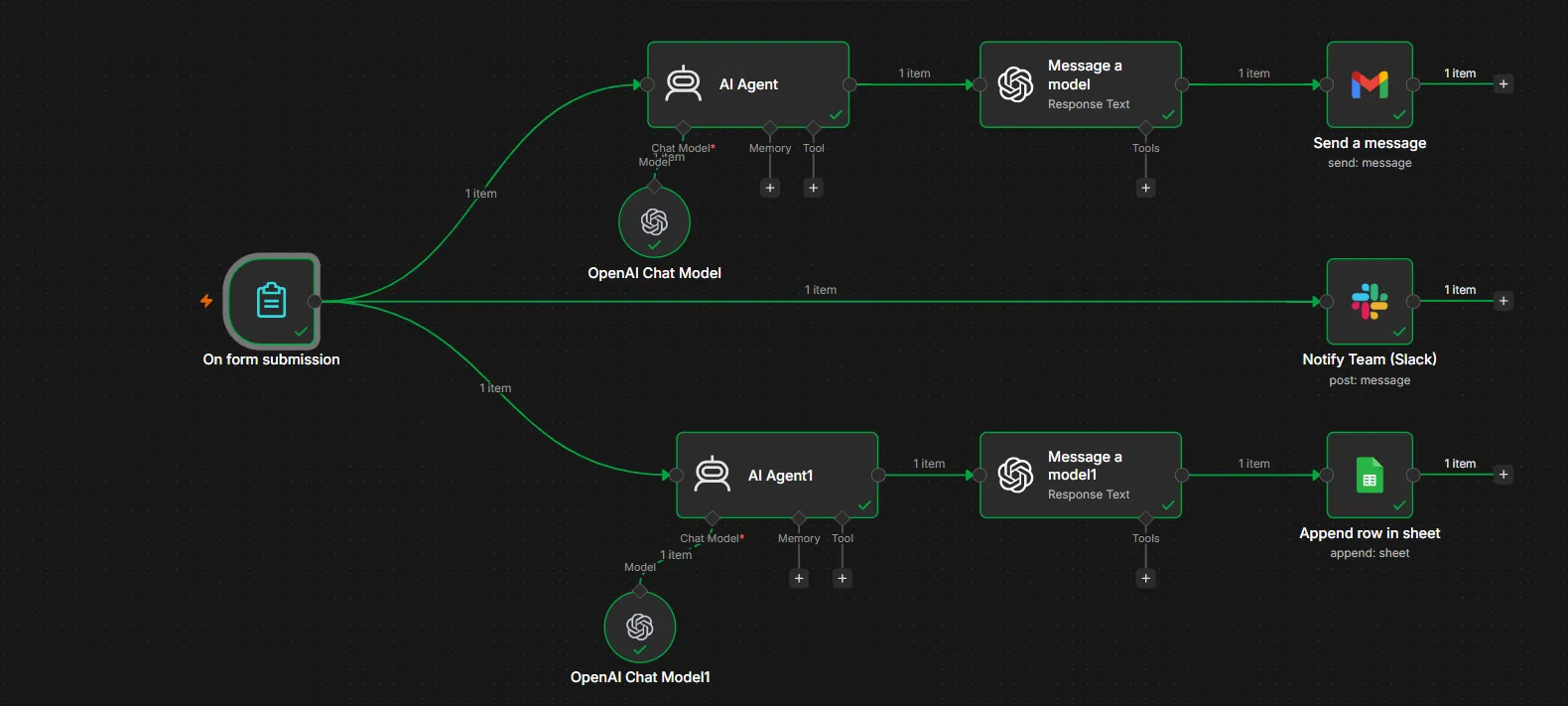
1.The n8n workflow: the form trigger feeds two AI agents, then Gmail and Google Sheets, plus a direct Slack alert. 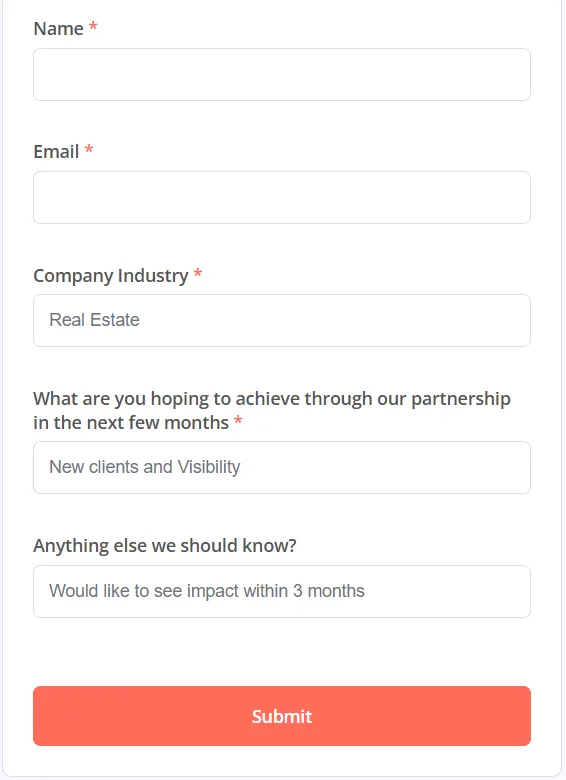
2.The intake form from a test run, with the name and email fields cleared.
Project brief
Deliverables
- n8n intake form with required fields
- AI agent that drafts a welcome email from the answers
- AI agent that structures the client record
- Gmail send step for the welcome email
- Google Sheets client record append
- Slack notification to the team
The challenge
Client details arrived through emails, calls and shared documents, and someone had to read each submission, write a welcome note and type the information into the client tracker. The back-and-forth slowed the start of each engagement, and records ended up in different formats depending on who entered them.
Our approach
The n8n form trigger collects name, email, company industry, goals for the next few months and any extra notes. The first branch sends the answers to an AI agent on an OpenAI chat model, followed by a message step that writes a welcome email reflecting the client's industry and goals; Gmail sends it to the client. A second AI agent turns the same answers into a consistent client record, and a Google Sheets step appends it as a new row. The third branch posts straight to the team's Slack channel so the account lead knows a new client has arrived.
The outcome
New clients receive a welcome email that speaks to their goals moments after they submit the form. The operations sheet gains a clean, consistently formatted record for each client, and the team hears about every new signup in Slack without checking an inbox.
- Trigger
- Intake form submission
- Stack
- n8n, OpenAI, Gmail, Slack, Google Sheets
- Handles
- Welcome email, client record, team alert
How we did it
Step 01
Agree the fields
We chose the questions the agency needs at the start of every engagement and made the key ones required.
Step 02
Write the AI steps
We wrote prompts for the welcome email and the client record so both stay consistent from one client to the next.
Step 03
Connect the tools
We linked Gmail, Google Sheets and Slack and set what each message and row contains.
Step 04
Test the run
We submitted test clients from different industries and checked the email, the sheet row and the Slack post each time.
Tools and platforms
- n8n
- OpenAI
- Gmail
- Slack
- Google Sheets
Why this project matters
The first days of a client relationship set the tone. A prompt, personal welcome and a tidy record mean the work starts without chasing details.
Questions about this project
Can the intake form ask different questions?
Yes. The form fields are set in n8n, so we can add questions such as budget, brand assets or access details, and both AI steps will use the new answers. The record can also go to a CRM or project tool instead of a sheet.
Can you build something similar for my business?
Yes. We adapt the workflow to the tools and process you already use, and we give you a fixed quote after a short call about what you need.
Related services and articles
Have a project like this in mind?
Tell us what you're working on. We'll come back with a clear plan and a realistic timeline.